Building a Smart Lighting Control System
Role
Tools
Skills
Timeline
Background
Govee is a smart-home app used to control Govee lighting devices
Users interact with devices from a central dashboard. Each device supports a set of capabilities and selecting a device opens a view with controls for each capability.
Terminology
- Device: A physical Govee light
- Capability: An action a device supports (power, brightness, color)
- Control: The UI element used to modify a capability
Overview
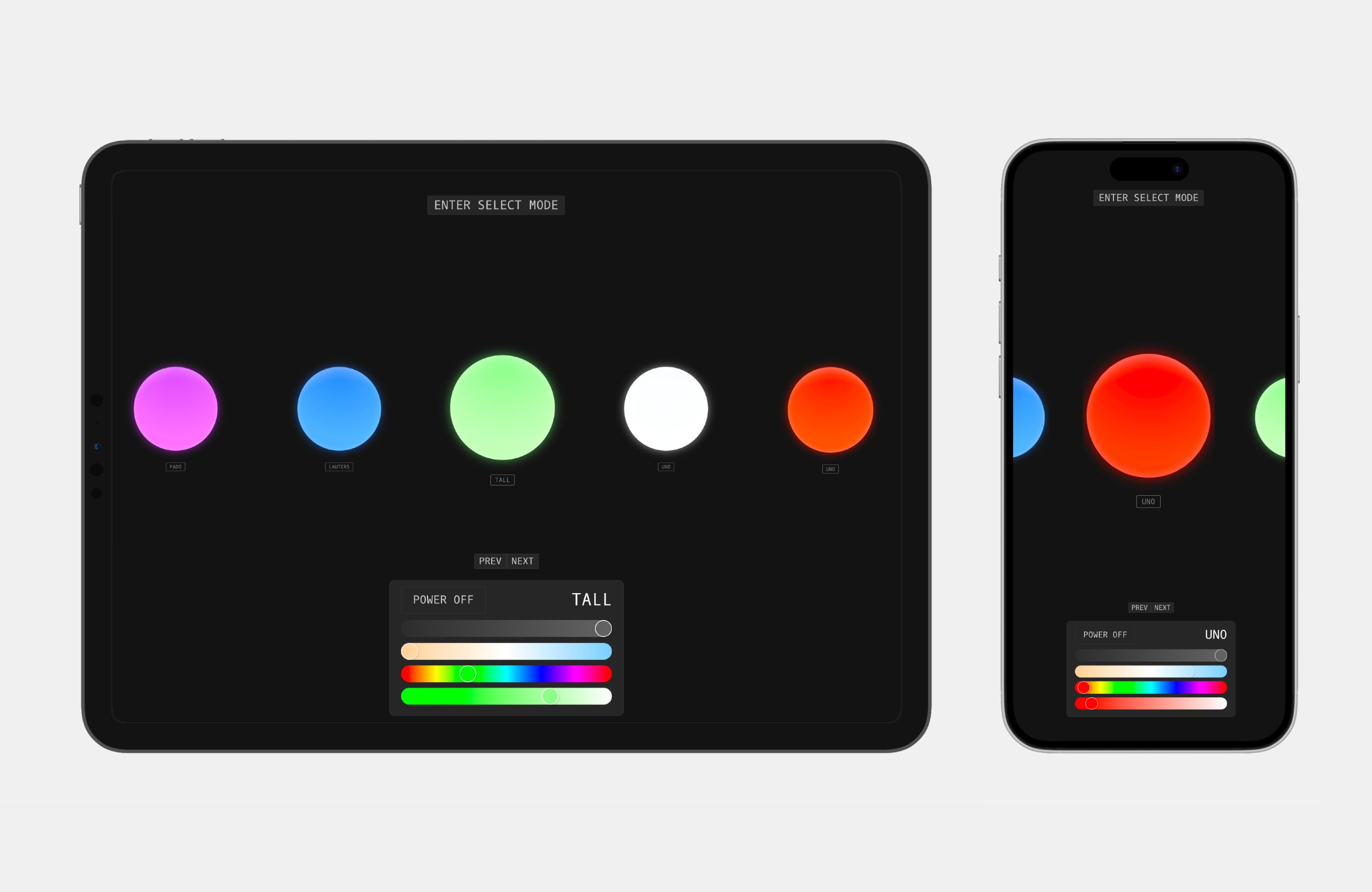
Govi is a remake of the Govee app
By focusing solely on light controls, the interface is more minimal, direct, and easier to navigate.
Motivation
Why rebuild an app that already works?
In July 2024, I was learning Next.js and deciding what to build alongside it. As a frequent user of the Govee app, I noticed repeated friction in everyday interactions and began exploring a redesign of the software, hashing out quality-of-life improvements along the way.
The Problem
Synchronous interactions create friction in everyday control
Feature wise, the Govee app is pretty on par with most smart home apps. One of the biggest drawbacks is its reliance on synchronous request handling.
When navigating between devices, users must wait for each device to load and changing the control temporarily block the UI until a request resolves. Additionally, the UI does not show the state of the bulb other than its on/off state.
This creates friction when making multiple changes, especially without predefined groups, making exploratory adjustments and batch updates feel slow and interrupted.
Existing Data Model
A device-first data flow
The original Govee interface mirrors the structure of the Govee API. The API returns a list of devices each which have its own supported capabilities. Capability is controlled independently, forming a hierarchical model where devices act as containers for capabilities and each capability maps to a distinct control.
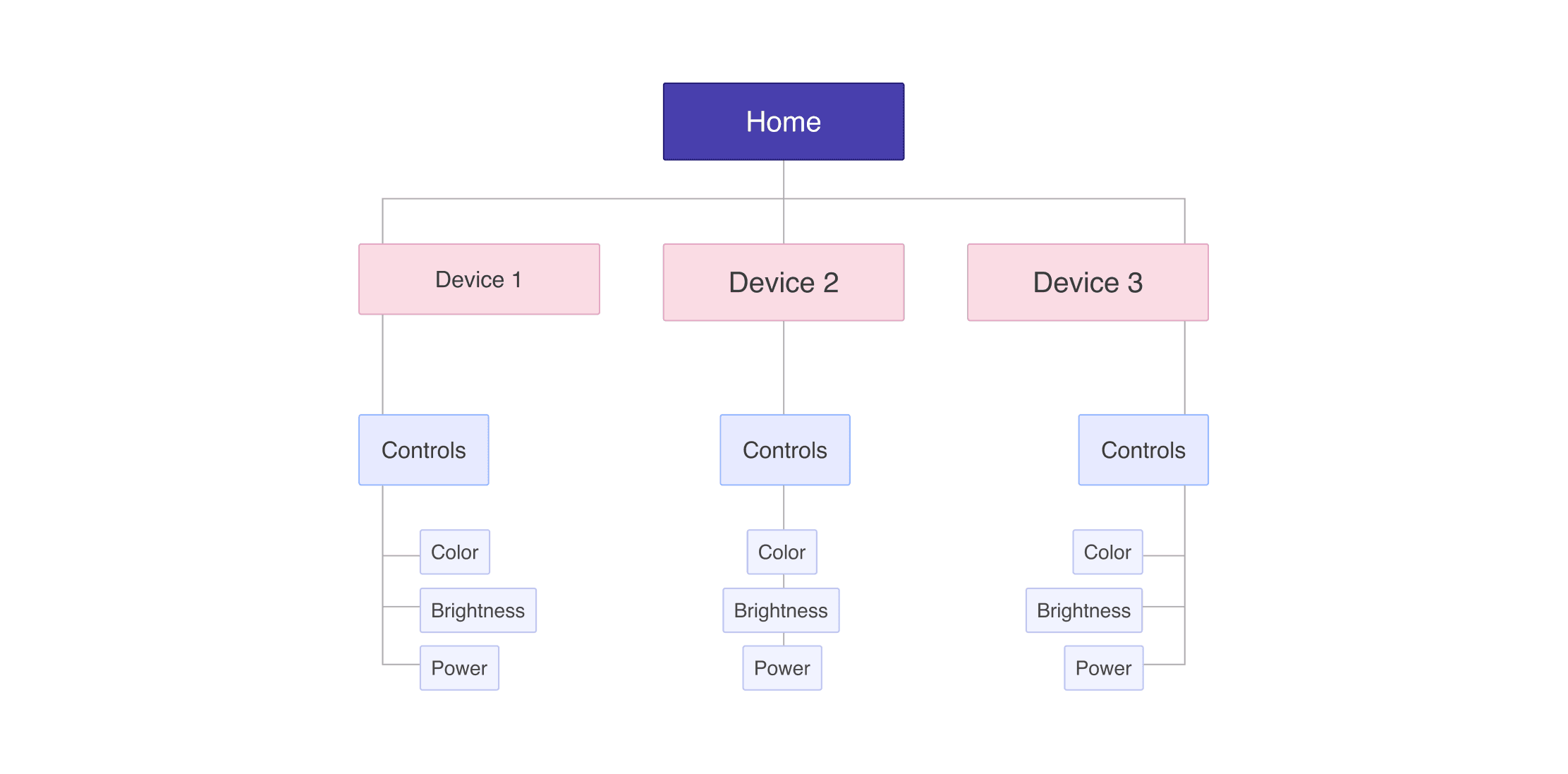
This hierarchy introduces excessive navigation and interaction overhead. Users must move through multiple layers to perform actions, wait for device state to load before making changes, and repeat the same flow when adjusting multiple devices.
Introducing Govi
Reframing the smart lighting experience
Govi is a faster smart-home dashboard designed specifically for lighting devices.
It surfaces device state immediately, reduces navigation depth, and supports fast, non-blocking batch updates.
Implemented Data Model
Decoupling devices from controls
Instead of mapping each device to its own nested capability views, Govi separates devices from controls. Devices are fetched from the API and filtered by supported capabilities, allowing each control to operate independently of any single device.
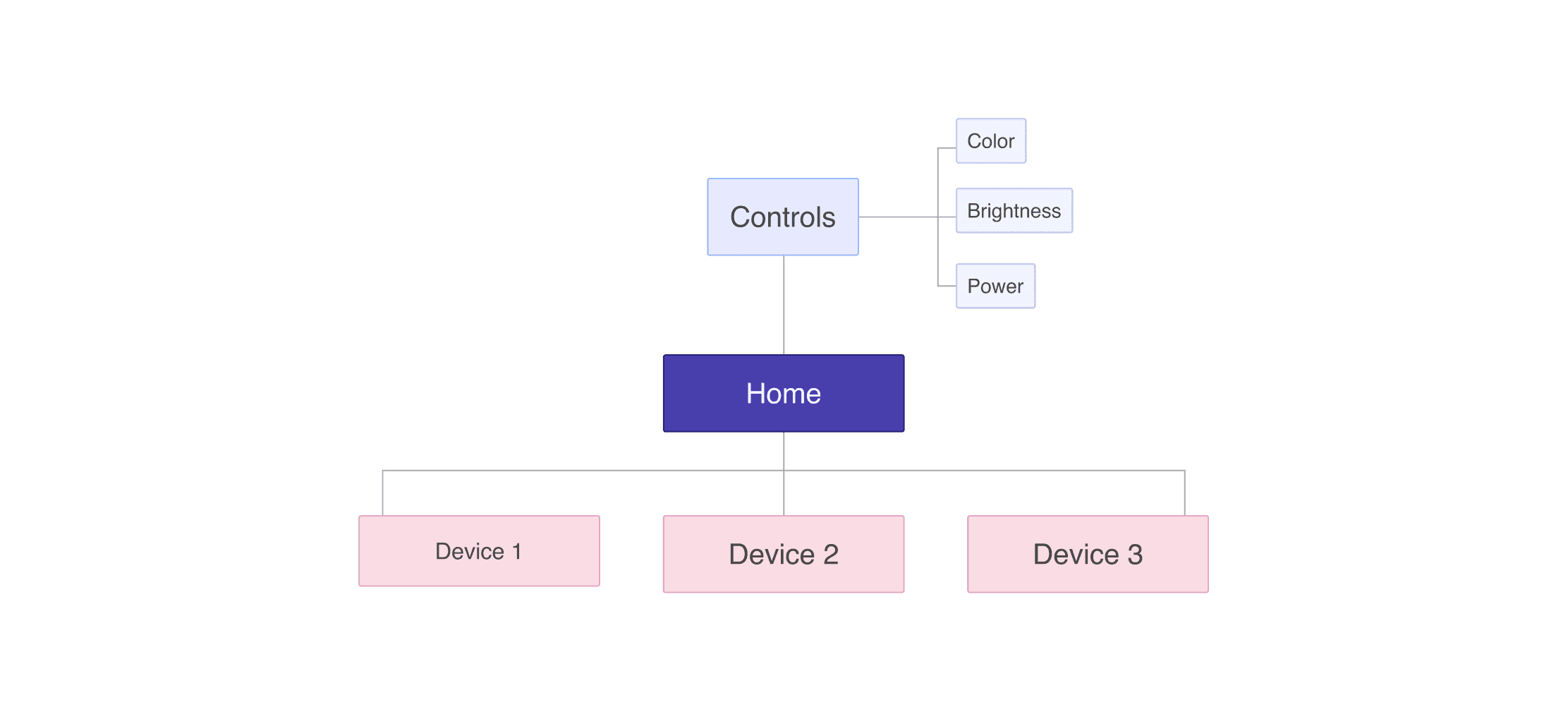
Controls apply updates based on the currently selected device(s).
This architecture limits control groups to devices that share the same capabilities, a tradeoff that works well for a lighting only system.
Device Navigation
Staying in the flow while switching devices
Instead of widgets, devices are displayed in a horizontal sequence with one device in focus. Users can swipe, scroll, or use navigation keys to quickly adjust the selected device.
Because device switching happens within the same view, tasks that once required multiple pages can now be completed by simply swiping through the dashboard.
Grouping Without Setup
Temporary device selection for Multi Select and Batch Controls
Govi introduces a selection mode that lets users apply changes to multiple devices at once by toggling active devices and controlling them together.
Most smart-home apps require predefined groups for batch controls. Here, users can group devices without prior configuration, apply changes, and return to individual control without additional navigation.
Challenges
Syncing UI to device updates
One of the main challenges in building Govi was keeping the UI in sync with the physical device state.
Each device is represented by a light-bulb display that reflects its current physical state. To keep this display accurate, the state is stored by device ID, with each entry holding the latest values for that device.
When a control request completes, the corresponding device state is updated, triggering a re-render and keeping the UI aligned with any changes. Controls can operate on one or many device IDs, allowing batch updates.
Next Steps
Iterations and insights for a future update
Feel free to check it out onGithub.Overall, I’m very satisfied with the final result, and it’s something I use over the original Govee app.
In the future, I would like to better support users with a larger number of devices. I currently manage 6 lights, but for someone with double or more, a swipe-based interface may not scale as well. To address this, I would explore adding a more compact grid view.
Learnings
Design and development as one
A lot of my time was spent developing the front-end of the product. By studying the API’s design I was able to mentally map how the system behaves and was able to make more informed design decisions.
Simple designs hold a lot of complexity
Something as simple as swiping to select the current device required careful research and iterations to implement. Through this process, I learned how to manage multiple element references usingref callbacksto drive DOM behaviour.